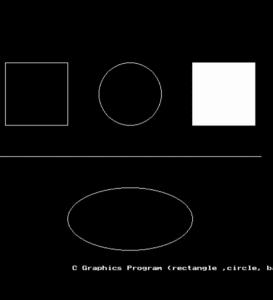

Using Graphics, we can draw(different shapes) geometric figures like circles, lines, ellipses, bars, etc.
In this, we set the coordinates like leftt,top, right,bottomm.Graphics.h library is used for graphics (initgraph method).
Introduction to Drawing Shapes(different shapes) Using C Graphics
C Graphics is used to create visual output like lines, circles, rectangles, and other shapes on the computer screen. In C programming, graphics are usually implemented using the graphics.h library, which is mainly supported in Turbo C and some modern compilers with WinBGI.
Graphics programming allows the programmer to move from simple text-based output to graphical output. Instead of printing text using printf(), we can draw shapes, diagrams, charts, and designs using special graphics functions.
What is Graphics in C?
Graphics in C means drawing shapes and displaying images on the screen using predefined functions from the graphics.h library. It works in graphics mode, which must be initialized before drawing anything.
Why Use C Graphics?
- To create shapes like lines, circles, and rectangles
- To design simple games
- To create charts and diagrams
- To understand basic computer graphics concepts
Basic Steps in C Graphics
- Include the graphics header file
#include <graphics.h>
- Initialize graphics mode using initgraph()
- Use drawing functions like:
- line()
- circle()
- rectangle()
- ellipse()
- Close graphics mode using closegraph()
Common Drawing Functions
| Function | Description |
| line() | Draws a straight line |
| circle() | Draws a circle |
| rectangle() | Draws a rectangle |
| ellipse() | Draws an ellipse |
| arc() | Draws an arc |
Conclusion
Drawing shapes using C Graphics helps beginners understand the fundamentals of computer graphics. Although modern programming uses advanced graphics libraries, learning C graphics provides a strong base for understanding how graphical systems work.
C program to draw different shapes using graphics
#include<graphics.h>
#include<conio.h>
main()
{
int gdd = DETECT,gmm,leftt=100,topp=100,rightt=200,bottomm=200,xx= 300,yy=150,radiuss=50;
initgraph(&gdd, &gmm, “C:\\TC\\BGI”);//initialization of graphics
rectangle(leftt, topp, rightt, bottomm);
circle(xx, yy, radiuss);//xx is vertical axis, yy is horizontal axis
bar(leftt + 300, topp, rightt + 300, bottomm);
line(leftt – 10, topp + 150, leftt + 410, topp + 150);
ellipse(xx, yy + 200, 0, 360, 100, 50);//draw ellipse
outtextxy(leftt + 100, topp + 325, ” C Graphics Program (rectangle ,circle, bar, line, ellipse )”);
getch();
closegraph();//closes the graphics
return 0;
}